
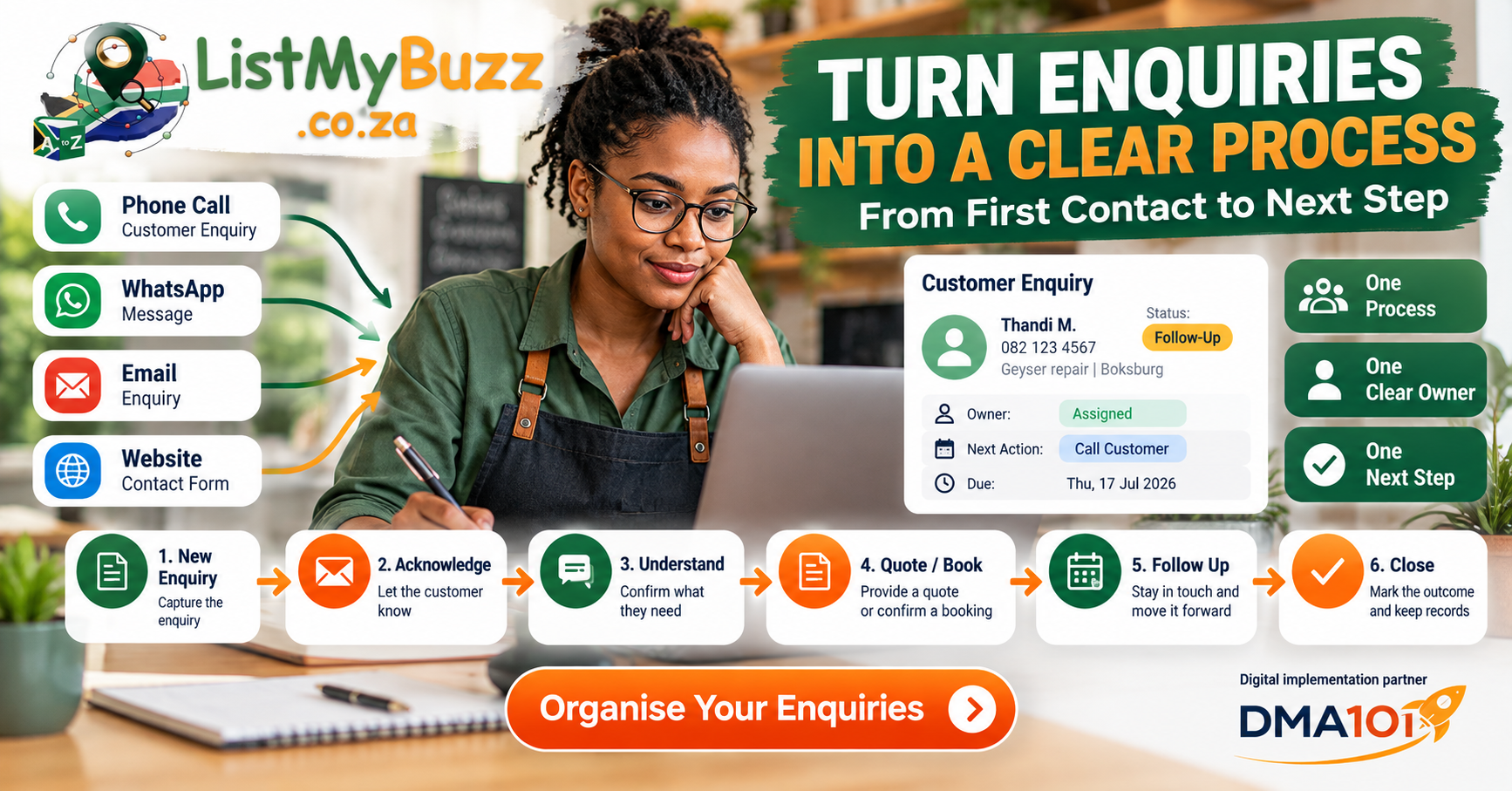
A customer calls.
Another sends a WhatsApp.
Someone fills in your website form.
A third person emails asking for a quotation.
By the end of the day, you have several conversations happening in different places.
The problem isn't necessarily getting enquiries.
The problem is answering: What happens to each one next?
For many small businesses, customer enquiries are managed through a combination of memory, recent calls, WhatsApp chats, inboxes, notebooks and spreadsheets.
That may work while enquiry volume is low.
As the business gets busier, it becomes easier for a genuine customer to be forgotten simply because nobody recorded the next action.
A simple enquiry process fixes that.
You don't need complicated software to begin.
You need a repeatable system.
Quick answer
A practical customer enquiry process can be reduced to eight stages:
8-Stage Enquiry Process
New Enquiry
Lead arrives via phone, WhatsApp, email, form or directory
Acknowledge
Confirm receipt and let the customer know their message arrived
Understand
Identify customer requirements, location and project details
Record
Log contact details and request in your central tracker
Assign
Designate an owner so responsibility is completely clear
Quote or Book
Send quotation, reserve calendar slot or arrange site visit
Follow Up
Polite check-in to confirm receipt and answer questions
Close
Record final outcome with status to complete the loop
Every genuine enquiry should have:
A customer.
A status.
An owner.
A next action.
If you can answer those four things quickly, your enquiry process is already much more organised.
Why create a customer enquiry process?
Because enquiries should not depend on one person's memory.
Imagine this situation.
Monday morning:
A customer asks for a plumbing quote on WhatsApp.
Monday afternoon:
You speak to them on the phone.
Tuesday:
They send photographs.
Wednesday:
You email the quotation.
Friday:
You think: "Did we ever follow up with that customer?"
Nothing is necessarily wrong with WhatsApp, phone calls or email.
The problem is that the important information is spread across several places.
A customer enquiry process gives the conversation a structure.
Instead of asking: "Where was that message?"
you can ask: "What stage is this enquiry at, and what happens next?"
The simple eight-stage enquiry workflow
The Eight-Stage Enquiry Workflow
New enquiry
Acknowledge the enquiry
Understand what the customer needs
Record the enquiry
Assign responsibility
Quote, book or progress the enquiry
Follow up
Close the loop
Stage 1: New enquiry
A new enquiry can arrive through:
The first job is simply to recognise: This is a genuine customer enquiry.
Not every incoming message needs to become a sales opportunity. Spam, supplier calls and unrelated messages should not clog the same process.
Stage 2: Acknowledge the enquiry
Let the customer know their request has reached you. That might happen immediately through a person or through an appropriate automated acknowledgement.
For example:
"Hi Thandi, thanks for contacting ABC Plumbing. We've received your enquiry. Please send your suburb and a photo of the problem if possible, and we'll advise on the next step."
The acknowledgement does not need to solve the entire enquiry. Its purpose is to establish contact and move the conversation forward.
Keep expectations realistic
Avoid promising: "We'll respond within five minutes." unless your business can reliably do that.
It is better to say: "We'll review your enquiry during our normal business hours." and meet that expectation consistently.
Stage 3: Understand what the customer needs
Before quoting or booking, collect enough information to make the next decision.
A plumber may need:
A photographer may need:
A salon may need:
A consultant may need:
Do not turn this into an interrogation. Ask only for information that helps move the enquiry forward.
Stage 4: Record the enquiry
Once you know it is a genuine business enquiry, record it somewhere. At minimum, capture:
| Field | Example |
|---|---|
| Customer | Thandi M. |
| Contact | 082 xxx xxxx |
| Source | |
| Need | Geyser repair |
| Location | Boksburg |
| Status | New |
| Owner | Kabelo |
| Next action | Review photos |
| Due | Today |
This can start in a spreadsheet. The important point is that the enquiry now exists somewhere other than an inbox or someone's memory.
Stage 5: Assign responsibility
Every enquiry should have an owner.
That doesn't mean one person must do everything.
It means someone is responsible for making sure the conversation moves forward.
For example:
Without ownership, you hear phrases such as: "I thought you replied." or: "Wasn't Sarah handling that one?"
Assigning responsibility removes ambiguity.
Stage 6: Give the enquiry a clear next action
A status tells you where the customer is.
A next action tells you what must happen.
These are not the same thing.
For example:
Status
Quote Required
Next action: Kabelo to prepare quote
Status
Waiting for Customer
Next action: Customer to send measurements
Status
Quote Sent
Next action: Follow up Thursday
A good process should let you look at an enquiry and immediately understand what happens next.
Stage 7: Quote, book or progress the enquiry
Not every enquiry becomes a quotation.
The next step might be:
The right action depends on the business. The process should reflect how your customers actually buy from you.
Stage 8: Follow up and close the loop
An enquiry should not remain open forever. After you quote, book or request information, decide what the next follow-up point is.
For example:
Quotation Follow-Up Schedule
Quote sent Monday
Deliver full proposal to the customer with scope and price
Check receipt Tuesday
Polite confirmation that document arrived and opened cleanly
Follow up Thursday
Check-in to answer questions, clarify scope or assist decision
Close or pause
Record final decision or pause enquiry respectfully if no reply
The timing should match the type of purchase. A customer choosing a haircut may decide quickly. A company considering a large building project may need considerably longer.
Every enquiry should eventually reach an outcome
Examples:
Closed does not mean failed. It means you know what happened.
Use a small number of statuses
A common mistake is creating an overly complicated pipeline. You probably don't need 18 stages.
A practical starting point is:
Core Enquiry Status Pipeline
New
Incoming lead arrived and awaiting initial review
Contacted
First response or acknowledgment sent to the customer
Information Needed
Awaiting photos, measurements, specs or site address
Quote / Booking
Quotation prepared or appointment slot selected
Follow-Up
Checking in to answer queries and assist the decision
Booked / Accepted
Quote approved or booking confirmed on the calendar
Closed
Final outcome reached (completed, declined, or paused)
You can adjust these stages as you learn how your business operates. Keep them understandable enough that your team actually uses them.
One enquiry process, many communication channels
Customers don't care which internal system you prefer. They may contact you in the way that is easiest for them.
The challenge is getting those enquiries into one process.
For example:
Incoming Channels to Unified Central Record
WhatsApp enquiry
Incoming chat captured directly into your tracker
Missed call
Automated text-back or immediate callback task
Website form
Structured form submission logged with contact data
Email enquiry
Inbound quote request routed to assigned team member
Directory request
ListMyBuzz profile enquiry added to active pipeline
The channel can differ. The internal process should become consistent.
Don't let WhatsApp become your entire CRM
WhatsApp can be excellent for customer communication. But as a business grows, a long list of chats does not automatically tell you:
A communication channel and a customer-management process are not the same thing. That distinction becomes increasingly important as enquiry volume grows.
How should you handle missed calls?
Treat a genuine missed customer call as an enquiry until you know what it is. A simple rule could be:
ListMyBuzz's current Growth Tools include inbound call handling, missed-call text-back and CRM workflows that can support this type of process when configured. But the software does not decide whether the customer is suitable for your business. Someone still needs to apply judgment.
What about after-hours enquiries?
After-hours messages should have a defined morning destination. For example:
The goal is not necessarily to operate all night. It is to prevent enquiries from disappearing simply because they arrived after closing time.
Create a daily enquiry routine
A process becomes stronger when there is a regular review. A small business could use something as simple as:
You may not need these exact times. The principle is to create a habit. Without a review routine, even a good CRM can become an expensive database nobody maintains.
Should you use a spreadsheet or CRM?
Start with the simplest tool that keeps the process reliable.
A spreadsheet may be enough when
A CRM becomes more useful when
The goal is not to use sophisticated technology. The goal is to make your enquiry process easier to manage.
Where automation can help
Once your manual process is clearly defined, repetitive administrative actions may be good candidates for automation. For example:
ListMyBuzz currently offers growth tools around CRM workflows, automated email and SMS follow-up, missed-call text-back, bookings, calendar integration, website lead capture and a unified inbox. Automation can make the process more consistent. It cannot guarantee that a customer will proceed.
Don't automate before defining the process
This is one of the most important points in the article. If your team cannot answer: "What should happen after a new enquiry arrives?" automation will not solve the underlying confusion.
First decide:
Then look at which steps can be automated.
Process first. Technology second.
Build a simple responsibility matrix
For a small team, the process could be:
| Activity | Owner |
|---|---|
| New enquiry review | Admin |
| Technical questions | Technician |
| Quotation | Owner / estimator |
| Appointment booking | Admin |
| Follow-up | Assigned salesperson |
| Complaint escalation | Manager |
| Closing record | Enquiry owner |
Your structure may be completely different. What matters is clarity.
How ListMyBuzz can fit into the process
ListMyBuzz is positioned as both a South African business-discovery platform and a business-growth platform. Its live site currently offers Growth Tools for calls, messages, CRM workflows, bookings, lead follow-up, website chat and unified customer communication.
That makes it particularly relevant at the point where a business has moved from:
"We need customers to find us."
to:
"Customers are contacting us. Now we need to manage those conversations properly."
The approved ListMyBuzz link map specifically identifies Growth Tools as the main destination for business owners struggling with follow-up, CRM, missed calls, bookings and automation.
Explore ListMyBuzz Growth Tools
CRM workflows, calls, messages, bookings, lead follow-up and unified communication.
The current package structure also includes an AIO Elite Buzz option focused on enquiries, bookings, follow-up, customer communication and lead management. Features and pricing should always be checked against the live package page before purchase because package details can change.
Don't let the tool become the process
A CRM, booking calendar or automation platform should support the way you work. It should not create unnecessary complexity. A useful system should make it easier to answer:
If your software cannot answer those questions clearly, the implementation may need simplifying.
When professional implementation may make sense
A basic enquiry spreadsheet is easy to build yourself. A connected customer-management system can become more technical. You may eventually want:
This is where professional implementation can be useful.
Where DMA101 can assist
Businesses that need a broader digital system can get professional support from DMA101. DMA101 currently offers CRM setup, workflow automation, lead pipelines, forms, email and SMS automations, task flows, unified inbox setup, missed-call text-back and broader digital customer-journey systems.
That support becomes relevant when the challenge is no longer simply:
"We need a spreadsheet."
and becomes:
"We need our website, customer enquiries, CRM, follow-up and booking system to work together."
ListMyBuzz remains the directory, discovery, listing and business-growth platform. DMA101 remains the supporting professional digital-growth and implementation partner, which follows the approved brand structure.
Explore DMA101 digital growth systems
CRM setup, workflow automation, AI chat and voice systems, websites and related digital implementation.
Neither a CRM nor automation guarantees customers, bookings, sales or revenue. Results still depend on customer demand, pricing, suitability, service quality, implementation and customer decisions.
Common enquiry-process mistakes
Leaving enquiries only in WhatsApp
Problem: Nobody can see the full pipeline.
Better: Record genuine opportunities in one customer tracker.
No owner
Problem: Everyone assumes someone else is handling it.
Better: Assign responsibility.
No next action
Problem: The enquiry exists but does not move.
Better: Every open enquiry should have a next step.
Too many statuses
Problem: Staff don't know which stage to choose.
Better: Start with a small number of meaningful stages.
No close-out status
Problem: Old opportunities remain open forever.
Better: Mark them accepted, declined, completed, postponed or no response.
Automating too much too early
Problem: A confusing manual process becomes a confusing automated process.
Better: Define the workflow first.
Your simple customer enquiry template
For each new enquiry, use:
You can use this in a spreadsheet, CRM or internal system. The structure matters more than the software.
Customer enquiry process checklist
Before calling your process complete, check whether your business can answer yes to the following.
Entry points
First response
Tracking
Quotes and bookings
Follow-up
Team
Automation
Frequently asked questions
The bottom line
A strong customer enquiry process does not need to be complicated. Start with this:
If a spreadsheet handles that reliably, use the spreadsheet. When the process becomes harder to manage, add a CRM, reminders, booking tools or automation where they genuinely solve a problem.
The aim is not to build the most sophisticated system.
It is to make sure you always know:
Who needs attention, what happens next and who is responsible.
Ready to organise your customer enquiries?
ListMyBuzz Growth Tools include selected CRM workflows, customer communication, booking, call handling and follow-up functionality designed to support a more organised enquiry journey.
Customer enquiry systems, CRM tools and automation do not guarantee enquiries, bookings, customers, sales or revenue. Results depend on customer demand, offer quality, pricing, service delivery, implementation and customer response.